Choose your starting point
Any profession or nursing, with an example that shows where every detail belongs.
Free to use · On mobile and desktop
Write your details and watch your CV take shape. Clear designs, writing support and a guided review all the way to your final file.
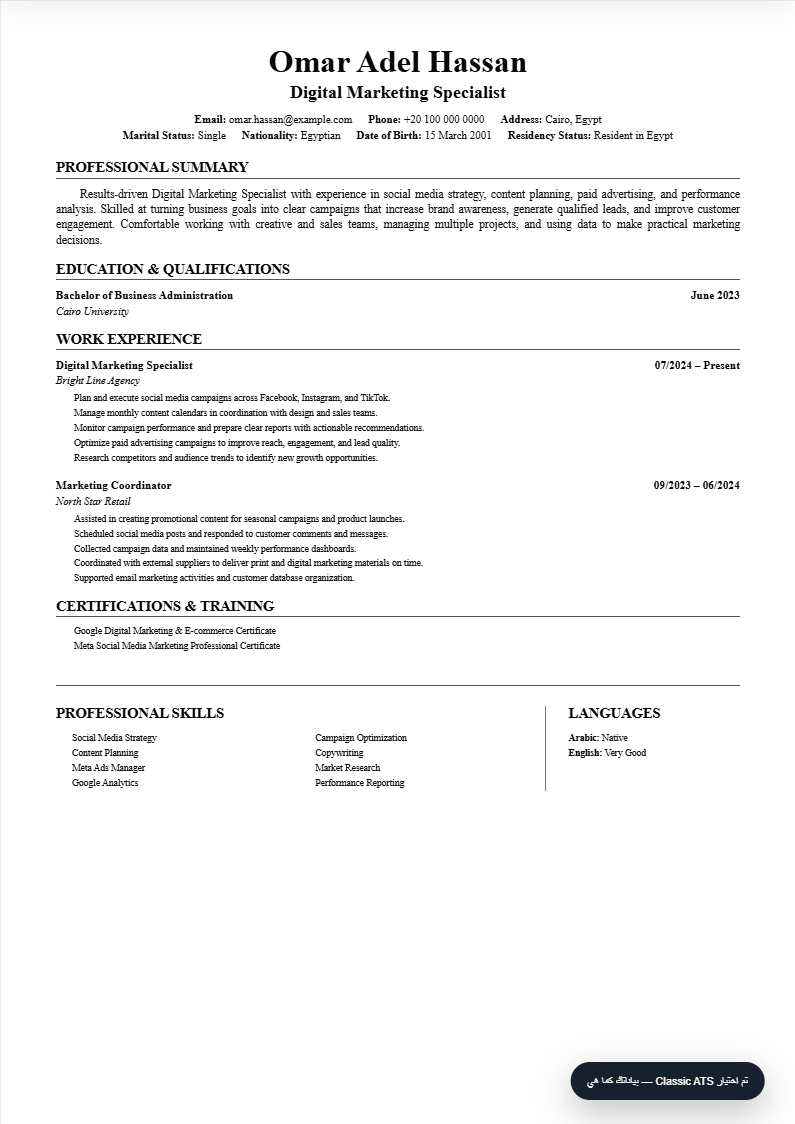
Fictional example data. Every design uses the same information.
CLEAR FROM THE FIRST STEP
Start with an example and replace every detail with your own. Keep your tools in one place.
Any profession or nursing, with an example that shows where every detail belongs.
Five familiar sections. Next opens the beginning of the section, and changes appear in the preview.
Choose a design, adjust text size, add your photo and certificate links, and check what is missing.
Save a version in My CV, then choose PDF, editable Word, or an image for sharing.
FIND YOUR STYLE
From a simple layout to a colored sidebar. Explore without rewriting your CV.
Simple and clear
Modern blue sidebar
Clean and spacious
Organized classic
For longer content
Executive style
Light and calm
Healthcare style
Editorial typography
German application style
A HELPER WHEN YOU NEED IT
Copy a ready ChatGPT prompt, add your real information, then bring the structured result back to the builder. Or use the helper inside each section.
REVIEW BEFORE YOU SEND
A local checklist for contact details, summary, education, experience and skills. The readiness score changes with your information. It is not a guarantee of ATS acceptance or a job.
✓ Clear name and professional title
✓ Valid contact information
+ Experience described in clear bullets
Review your CV in the builder ↗BEFORE YOU START
No account is needed to build and save your CV on this device. Automatic Drive upload is not available yet; you can add a link to an existing file.
Saving adds a separate version to My CV on this device. Downloading creates a file you can use elsewhere. Keep your files when changing devices or browsers.
No. It checks disclosed content rules within this product. Hiring systems differ; matching a role requires reviewing the vacancy and the final file.
Yes. Photos are optional and have display controls. Add a certificate link to make its name clickable in the preview and PDF. The reader must have access to the linked file.
Open Download CV in the builder, then choose PDF, Word or image. Review demo information and any notices before confirming. Word is editable and may differ from the PDF layout.
YOUR NEXT STEP IS CLEAR
Current tools are free. Example data is for illustration only.